


Using the Brightspace Accessibility Checker
The Accessibility Checker in Brightspace is a built-in tool that helps users create materials that are accessible to readers with disabilities. It identifies and suggests fixes for common accessibility issues, ensuring that content can be easily read and understood by individuals using screen readers or other assistive technologies. The tool is important because it promotes better communication and equal access to information for all users, making it a valuable resource for creating inclusive content.
Opening the Accessibility Checker
Any time you create content directly in Brightspace, you are working in a rich text editor with a toolbar at the top. Near the right side of that toolbar is an icon that looks like a person inside a circle. That is the accessibility checker.

Repairing Issues with the Accessibility Checker
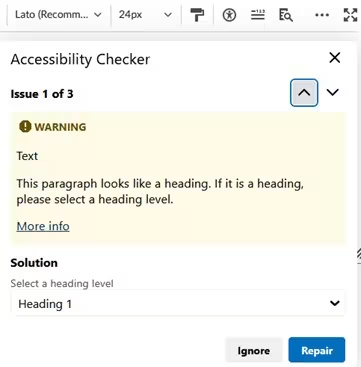
In some cases, the Accessibility Checker will give you a warning and a solution to repair the issue. For example, as seen in the screenshot below, if it thinks that paragraph text should be tagged as a heading, it will provide this guidance and suggest a repair. It will also provide a link to additional information to help you determine how and whether to address the issue that has been flagged.
Select Ignore if you believe the checker has flagged an issue inaccurately. Select Repair to have the checker automatically fix the issue.
Reviewing Errors Flagged by the Accessibility Checker
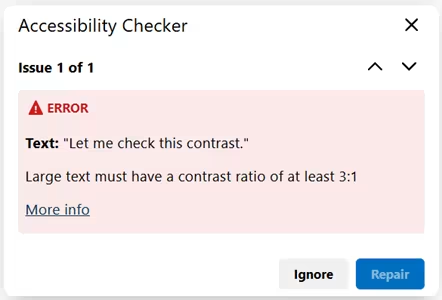
In cases where the accessibility checker cannot propose a solution, the checker will simply flag an error for your review and provide a link to resources to help you determine whether you need to repair an issue. For example, the checker can detect color contrast issues but is not able to solve them.
If you review and find an accessibility error, return to the text and repair it. Then be sure to run the accessibility checker again to confirm the solution.
If you review the error and determine that it was flagged inaccurately, select Ignore.
Learn More about the Brightspace Accessibility Checker
Visit the Brightspace Accessibility Checker page on the Brightspace Community for more information about this tool.