

Hello Drupal Editors,
As part of a scheduled security and platform update, we're introducing a new process for embedding images in the Drupal editor. Here’s what you can expect:
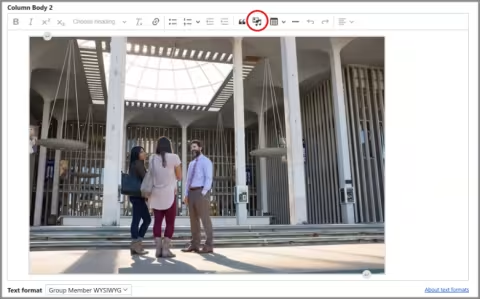
Updated Image Icon
The image icon in the editor has changed. Instead of the traditional picture icon (mountain and sun), you’ll now see the same image with a music note overlay.
Enhanced Image Library
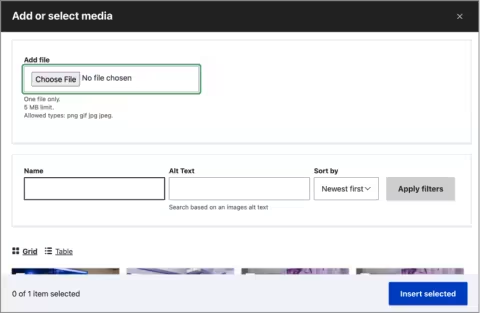
The image library interface has been redesigned for easier use:
- Upload new images directly at the top of the window — no need to switch tabs.
- Below the upload section, you’ll find:
- Image search by name or alt text
- Recently uploaded images
- View options: grid or table format
New Image Editing Workflow
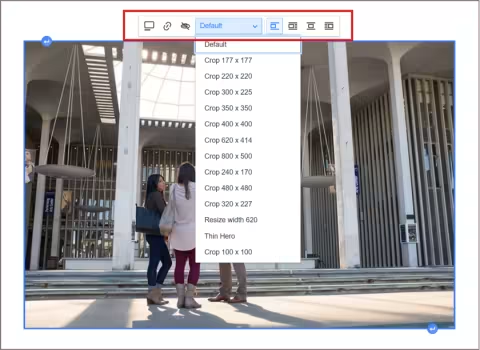
After selecting an image, it will appear in the WYSIWYG editor immediately. To access style editing options:
- Click the image to reveal a small menu above or below it.
- Options include:
- Toggle caption
- Add a link
- Override alt text
- Choose image styles via dropdown that displays “Default”
- Break text
- Align left, center or right
Feel free to contact WebServices@albany.edu if you have any questions or need assistance with the new image editing process. Thank you for your patience during this critical update!
Regards,
University at Albany Web Services