


Get Connected. Stay Connected.
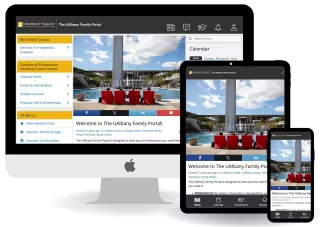
Stay informed and connected throughout your student’s college journey — from application to graduation. You'll get the updates, resources and reminders you need to help them thrive at the University at Albany.
The free UAlbany Family Portal offers families and supporters timely updates, campus news, key deadlines, events and resources designed to support student success and engagement at UAlbany.
Students can also use the portal to share certain educational records with family members and supporters.
Create a UAlbany Family Portal Account
sign-up
Current Students
Current students' accounts are automatically created.
Log into the UAlbany Family Portal using the Student Login. You will be asked to provide your NetID and password.
Family Members & Supporters
To create a new account, follow these instructions:
- Open the UAlbany Family Portal login page. You can use the Sign Up link to register or log in with Facebook, LinkedIn or Google.
- Fill in your name and email, create a password and click “Create Account.” (Note: If you have a UAlbany email address, please use your personal email address instead to create a family or supporter account.)
- Complete a quick on-boarding survey.
- Click on “Discover Communities” and add the options that interest you.
- Update your profile by clicking on the person icon located in the top right corner of the page and selecting “Edit my Profile.”
- Customize your notification settings by clicking the person icon and selecting “Edit Notification Preferences” to receive alerts when there are updates or changes.
Share or Access Educational Records
Current students can use the UAlbany Family Portal to grant family members and supporters direct access to select educational records by creating a “connection.”
The portal offers an electronic Family Educational Rights and Privacy Act (FERPA) authorization, streamlining the process for requesting access to a student's academic and financial information.
It is important to know that the student remains in control of their information and can choose which records to share and with whom.
How connections work in the UAlbany Family Portal
Connections are only established if a student approves the connection and only the information approved by the student through the selected FERPA waivers is visible to the selected family member or supporter. Information is updated nightly.
Authorization grants access to information only. It does not authorize a family member to act on behalf of a student, and students may modify or revoke access at any time.
Depending on the FERPA waivers approved by the student, authorized family members may be able to view:
- Class schedule and enrollment information
- Unofficial transcript including final grades
- Student advisor information
- Degree application status
- Student account balance
- Financial aid award information
- Financial aid tasks
- Student account holds
- Dining balance and plan
- Housing next steps and status
- Admitted students next steps
Please visit the Registrar’s Office’s FERPA Information for Families webpage for more information on FERPA.
Instructions for Family Members & Supporters
connect
Initiate a connection with your student
- Log into your UAlbany Family Portal account.
- Click the graduation cap icon in the top-right corner of the page.
- Click “Go to my connections.”
- Click “Add Connection.”
- Enter your student’s @albany.edu email address.
- Choose your relationship to the student.
- Create a 4-digit PIN.
- Select the records you would like to access.
- Click “Connect to your Student” to initiate your request. Note: Your student must approve the request before you can access their information. Once your student approves, the access is updated overnight.
What to do if you have trouble connecting with your student
- Cancel the request by clicking on the graduation cap, scroll to the bottom of the menu and click “Cancel Connection.”
- Follow the directions provided above to initiate a connection.
- Your student will receive an email and will need to approve your request.
What to do if you do not know or have forgotten your PIN
When you request access to your student's records, you will be prompted to create a PIN.
If your connection request is approved by your student and you need to call for information regarding their records, you'll be required to provide this PIN.
This process serves confirms your identity and ensures you are authorized to access to your student's records.
If you forgot your pin, follow the steps below to reset it:
- Log in to the UAlbany Family Portal.
- Click on the graduation cap icon in the top right side of the page.
- Click on “Go to My Connections.”
- Click on “Forgot PIN? Click to reset.”
Instructions for Students
Approve a connection request from your family member
You will get an email any time a family member or supporter makes a connection request.
- When you click on the link, you will have the option to view the request.
- When you approve the request, you can grant access to everything or select individual items to approve.
- Once access is granted, your family member or supporter will receive notifications via email and within the UAlbany Family Portal.
FERPA authorization only grants access to information; it does not grant the right to act on your behalf. FERPA authorization will remain valid until you rescind it.
Please visit the Registrar’s Office’s FERPA Information for Students webpage for more information on FERPA.
Initiate a connection request with your family member
- Log into the UAlbany Family Portal using the Student Login.
- Any new connection requests will appear on your portal's homepage.
- Click "Add My First Connection" or "Add Connection."
- Enter the information of the person to whom you wish to grant access.
- Select the records you wish to share.
Remove or modify a connection
- Log into the UAlbany Family Portal using the Student Login.
- Select the active connection you would like to modify.
- To adjust the records this person has access to, select or deselect from the listed check boxes and click “Update Connection.” When you remove access to a specific record, your family member’s access is removed immediately.
- To cancel the connection and remove all access click “Cancel Connection.” When cancelling a connection, your family member’s access to any of your educational records is removed immediately.
UAlbany Family Newsletter
The UAlbany Family Newsletter has been replaced by the UAlbany Family Portal. Review archival newsletters from Academic Year 2025-2026 below.