Institutional Services |Equipment Management | Procedures
Procedures
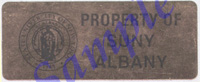
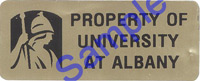
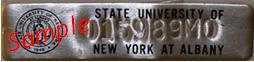
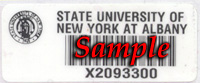
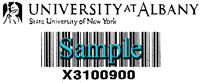
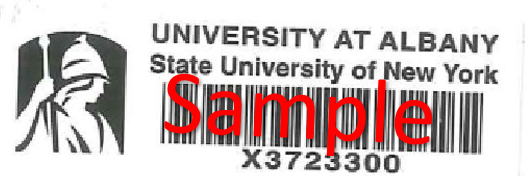
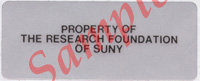
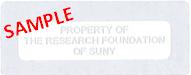
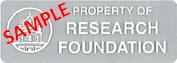
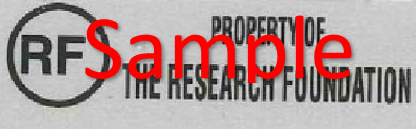
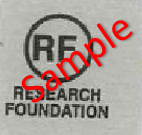
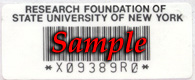
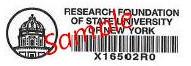
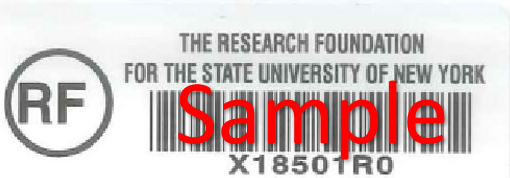
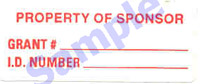
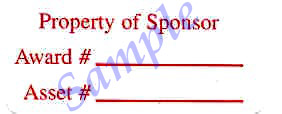
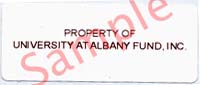
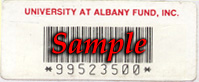
ASSET(s) TAGGING All newly acquired asset(s) must be identified with a bar-coded identification tag, affixed by the OEM staff at the time of acquisition. Attached to the departmental copy of all Purchase Orders for asset(s) is a "New Asset Receipt Form". After receipt and inspection of a new asset(s), complete and send this form to OEM. OEM staff will then inspect the new asset(s) and attach an "Ownership/Inventory Bar-Code tag" to the new asset(s). For example, assets purchased with State dollars are identified with tag numbers that end in "00". Assets purchased with Research Foundation sponsored-program funds are identified with tag numbers that end in "R0". See sample tags.
Back to List
OFF-CAMPUS USE OF ASSET(s) When assets are used off-campus or at a facility that is not part of your normal work area, it must be authorized by the departmental account signatory with a completed "Off-Campus Use Authorization Form". This form must be on file with the OEM. OEM should also be notified when the asset(s) are returned to the campus. OEM will only accept one asset per form.
Back to List
INVENTORY A physical inventory of all asset(s) is conducted annually by the staff of OEM. Account Managers are provided with notice of the inventory at least two weeks in advance. Please notify OEM of any sensitive areas where departmental staff should accompany the OEM staff for inventory. Account Managers must verify that all assets that are used at off-campus sites are correctly recorded on the departmental inventory report. The Account Manager will also be asked to account for any assets that are not located as a result of the physical inventory. The OEM must be notified when a staff member leaves employment, especially when that person has been given approval for off-campus use of asset(s).
Back to List
LOCATION CHANGES OF ASSET(s) OEM should be kept informed of the location changes of any asset(s). An "Asset Relocation Authorization Form" should be completed and sent to OEM whenever asset(s) are moved to another department.
Back to List
LOSS OR THEFT OF ASSET(s) Any loss of asset(s), including cases of theft or vandalism, should be reported to the Dean, Director, or Department Chair, the University Police Department, and the OEM. A copy of the police report should be sent to OEM.
Back to List
SURPLUS ASSETS When a department has surplus, scrap, obsolete or reusable asset(s), the asset(s) must be surplused through the OEM.
State Assets: A "Property Status Change Request Form" should be used to advise OEM of the excess asset(s). Asset(s) may then be removed to a surplus holding area. Asset(s) that are in good condition are retained, and either redistributed elsewhere on campus or made available to other State Universities and State agencies. All asset(s) that are in scrap condition are disposed of when the Office of General Services gives approval. Office of General Services determines when asset(s) are of no use to other campuses or agencies, and at that point conducts public auctions to dispose of the surplus, usable asset(s).
Research Assets: Research assets that are not needed for the project and are eligible for sharing, transfer or disposal should be reported by the Project Director. A "Property Status Change Request Form" must be completed and sent to OEM, indicating the condition and status of the equipment. Property that is sponsor-owned must have the sponsor's approval before it is surplused. Once the Property Status Change Request Form is completed by the Project Director and Department Chair, it is sent to the OEM for signature of the Property Control Officer and the University Controller. Asset(s) may then be moved to a surplus holding area for redistribution. Assets that are in scrap condition may be disposed of at this time.
Trade-Ins: Whenever possible, older asset(s) should be traded in when new equipment is purchased. (State-owned equipment cannot be traded in on a Research Foundation purchase.)
Back to List
TRANSFER OF RESEARCH ASSET(s) If a project director wishes to transfer asset(s) acquired through grants or contracts to another institution, a "Property Status Change Request" form must be completed and sent to OEM. Sponsor-owned assets must have sponsor approval prior to the transfer.
Back to List
ASSET(s) PURCHASED WITH MULTIPLE FUNDING SOURCES Asset(s) that are purchased with both State and Research Foundation funds are considered State-owned assets and all State regulations and disposal regulations apply. It will be tagged as a State asset.
Back to List
NEW YORK STATE PROCUREMENT CARD Use of the New York State Procurement Card is mandatory for any state funded purchase up to $4,999. For the purchase of equipment and furniture as well as components to enhance an existing piece of equipment or furniture you must complete a "New Asset Receipt Form". Upon receipt of this form, a staff member from the Office of Equipment Management will make arrangements with you to affix either an "Ownership Tag or a "Bar-Code Tag to the asset(s). It is critical that the New Asset Receipt Form is completed in full and that a copy of the necessary paperwork (copy of invoice, packaging slip or other form of paperwork) is included for reference. All assets purchased with the New York State Procurement Card are considered State-owned and therefore, all State regulations regarding property retention and disposal apply. Card-holders must change the sub object for credit card purchases of equipment from 3095 to 7395 on the reconciliation screen in the Procurement Card system.
Back to List
SURPLUS SHOP Newly implemented updates to our web page has made it possible for you to view surplus items available in our Surplus Shop. Any items described in this section of the OEM web page may be available for redistribution to your departmental area. You will become the custodian of these items and they will be assigned to your departmental account.
Please note these items are for use for official University business and are not available for other State Agencies or your personal use.
All items have been removed from other University sites but have been determined to be in usable condition.
Please use the link below to access the available surplus and to request the item(s) you may need.
Back to List
|